Microsoft Navision and Business Central are both Microsoft business management solutions but they represent different stages of Microsoft’s ERP development. Navision refers to older generations of the software while Business Central is the newer platform built for modern business needs.
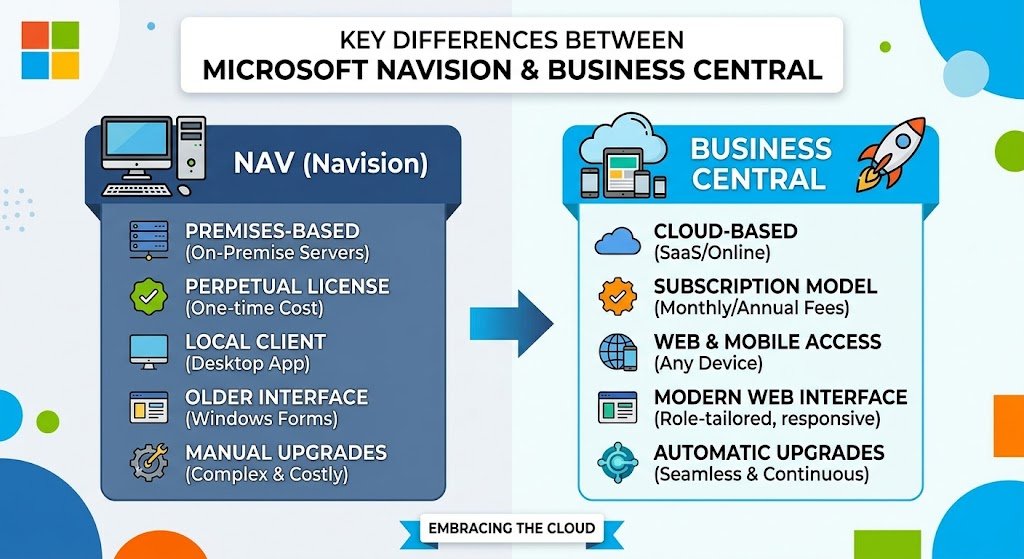
The main differences include technology, deployment, updates, integrations, customization and overall business management capabilities.
Product Generation and Development
Microsoft Navision was an ERP solution for finance, sales, purchasing, inventory and operations. It later evolved into the Dynamics family.Business Central is the modern successor to Dynamics NAV building on Navision with newer features, security updates, cloud capabilities and regular improvements.
Cloud and On-Premises Deployment
One of the biggest differences is how businesses can deploy the software. Older Navision installations commonly run on company-managed servers or local infrastructure.
Business Central supports cloud deployment through Microsoft and also provides an on-premises option. Cloud deployment reduces the need for businesses to maintain their own ERP infrastructure and makes remote access easier.
Modern User Experience
Navision has an older interface that may feel less modern. Business Central offers a cleaner interface with dashboards, role-based workspaces and easier access to business data.
Regular Updates
Navision versions generally required businesses to plan major upgrades when they wanted newer functionality. These upgrades could require significant technical work especially when the system contained extensive customizations.Business Central follows a more continuous update model, particularly in its cloud version. Microsoft releases new capabilities and improvements regularly helping businesses keep their ERP environment current.
Integration With Microsoft Tools
Business Central has strong integration with the Microsoft ecosystem. Businesses can connect it with tools such as Microsoft 365, Excel, Outlook, Teams and Power BI.Navision can also integrate with external applications but newer Microsoft integration capabilities are generally built more directly into Business Central. This can make everyday workflows easier for companies already using Microsoft products.
Flexible Business Solutions
Navision often relied on custom development to meet specific business requirements. Older installations may contain custom code designed for individual companies. Business Central uses an extension-based approach making it easier to add features and manage future updates.
Financial Management
Both systems support important financial processes such as accounting, budgeting, purchasing, sales and financial reporting.Business Central expands these capabilities with modern reporting, automation, analytics and integration options. It can also connect business data across departments, giving users a more connected view of financial operations.
Inventory and Supply Chain
Navision provides tools for inventory management, purchasing, sales orders and other operational activities. Businesses have used these capabilities to manage products and supply processes.Business Central builds on these functions with modern inventory, warehouse, purchasing, sales and supply chain features. Its integration capabilities can also help businesses connect operational information with financial data.
Reporting and Business Intelligence
Reporting is another important difference between the two systems. Older Navision environments may rely on customized reports or external tools for specific business information.Business Central works more closely with modern analytics tools such as Power BI. It helps businesses create dashboards, analyze data and turn ERP information into clear reports and useful business insights.
Security and Access Control
Older Navision systems depend largely on the security setup of the specific installation, server environment and version being used.Business Central uses modern Microsoft security and identity technologies particularly in cloud environments. Organizations can manage user access and permissions according to business roles and responsibilities.Regular platform updates also help businesses address security and compatibility requirements.
Mobile and Remote Access
Traditional Navision installations were mainly designed around desktop and local business environments. Remote access often depended on the technical setup created by the organization.Business Central supports browser-based access and modern mobile experiences. Employees can access business information from different locations, which supports remote and flexible working environments.
Business Central as the Modern Successor
The relationship between the two products is important. Business Central is not simply a completely separate ERP product from Navision. It represents the modern evolution of the technology that began with Navision and later continued through Dynamics NAV.For businesses still running older Navision versions, moving to Business Central can provide access to newer Microsoft technologies, cloud capabilities, integrations, security improvements and ongoing product development.
Which System Fits Modern Business Needs?
The choice depends on the company’s existing system, technical requirements, budget, customization level and future plans. Businesses already using an older Navision version may need to evaluate their customizations and integrations before considering a move.Business Central is designed for organizations that want a modern ERP environment with cloud options, Microsoft integrations regular updates and scalable business management features.
Sum up
The key differences between Microsoft Navision and Business Central mainly involve technology, deployment, updates, customization, integration, reporting and user experience.Navision remains important because it forms part of the history and development of Microsoft’s ERP solutions. Business Central builds on that foundation while offering a more modern platform for businesses that need connected, flexible and continuously updated business management.
About the Author